
The Chaos of a Bad IMAP Email Migration
Don't let an amateur handle your corporate communication data. The consequences can be devastating.
Lost Important Emails
If the MX records are switched before the new server is ready, or if the delta sync isn't done, crucial client emails will bounce or vanish forever.
Broken Folder Structures
Poorly executed IMAP syncs can flatten nested folders, mixing years of organized archives into one messy inbox for your entire company.
Password Chaos
Manually recreating accounts and forcing users to reset passwords causes mass confusion and floods your IT department with support tickets.
Blacklists & Spam
Failing to properly configure SPF, DKIM, and DMARC on the new server will cause all outgoing emails to land straight in your clients' spam folders.
Our Proprietary cPanel Email Migration System
We don't rely on basic scripts. We've built an enterprise-grade migration platform. You just provide a simple spreadsheet, and we handle the rest.
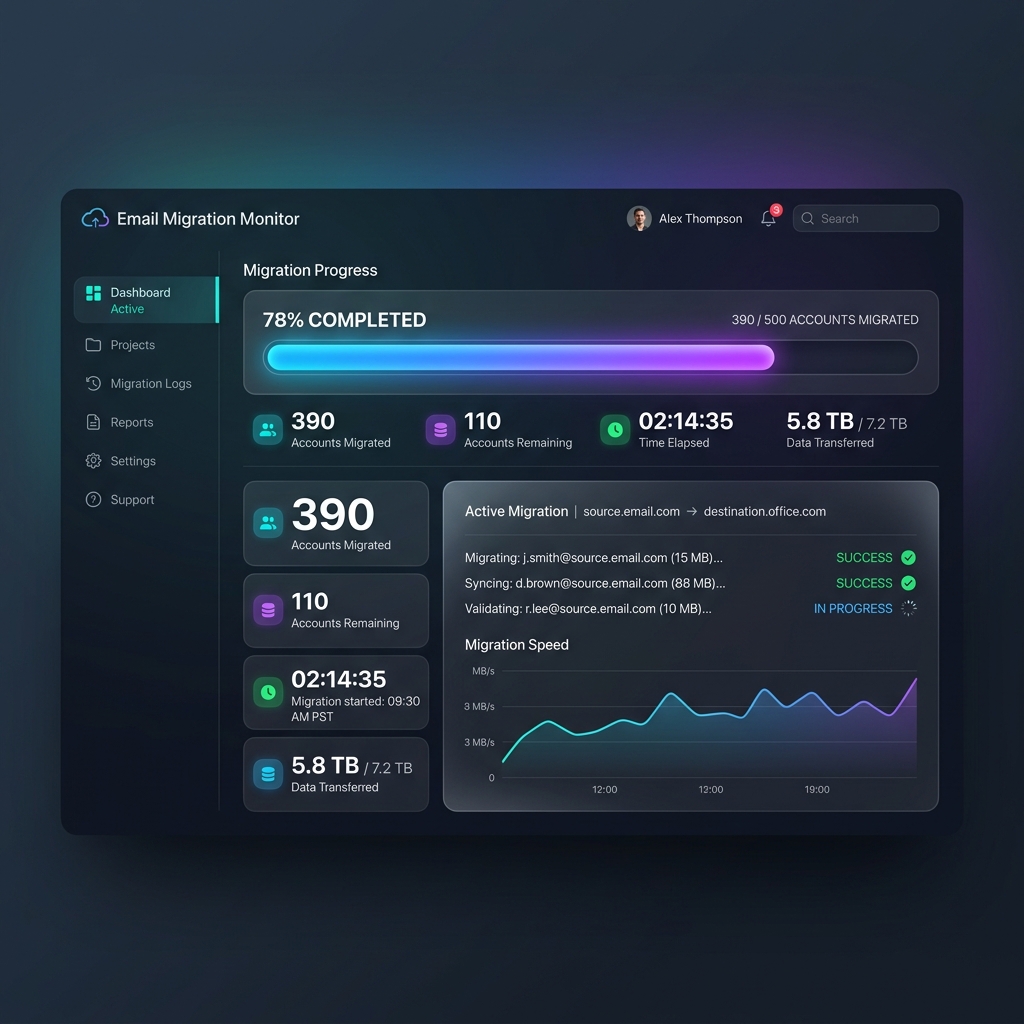
Real-Time Tracking Dashboard
Once we start your migration, you receive access to our custom dashboard. You can track the progress of thousands of accounts in real-time, completely transparently.
- Time Metrics: Monitor Time Elapsed and Estimated Completion times continuously.
- Progress Bars: View exact counts of Accounts Migrated versus Accounts Remaining.
- Active Retries: Real-time error reporting and automated IMAP connection retries.
It Starts With a Simple Spreadsheet
No need to learn complex APIs or manually recreate accounts on the new server. Just upload a basic 2-column CSV or Excel file containing the email addresses and passwords.
Our system automatically parses the file, provisions all email accounts on your new cPanel environment, and initiates the IMAP sync.
Download CSV TemplateMass cPanel Email Migration Services
We handle seamless mass migrations between any providers. You choose the destination, we do the heavy lifting.
Enterprise SaaS Providers
Moving away from high per-user monthly costs on Google Workspace or Microsoft 365? We can transition your entire team to your new cPanel server smoothly and without data loss.
Unreliable Shared Hosting
If your current host has terrible email deliverability or frequent outages, we'll extract your data and safely move all your accounts to your own cPanel environment.
Legacy & Custom Servers
Migrating from an old Zimbra, custom mail server, or generic IMAP setup? Our system connects directly via IMAP to pull all folders and messages intact directly into cPanel.
Complete cPanel Email Migration Features
Everything you need for a flawless, zero-data-loss email transition.
Continuous IMAP Sync
Our proprietary engine syncs data continuously in the background, allowing your team to keep working without interruption until the final DNS cutover.
Folder Structure Preservation
Our system perfectly maps your source folder architecture, ensuring that "Sent Items", "Drafts", and any custom nested archives remain exactly as they were.
DNS & Deliverability Setup
Beyond migrating data, we properly configure your new MX records along with SPF, DKIM, and DMARC to guarantee perfect inbox deliverability.
Automated Account Provisioning
Using the spreadsheet you provide, our system automatically creates all the required mailboxes and assigns the correct passwords on the new server instantly.
Our 3-Step Email Migration Process
We handle the technical complexities so your team can keep working.
Pre-Sync (Background Copy)
We recreate all accounts on your chosen destination server and perform an initial sync of all historical emails. This happens entirely in the background, and your users continue using the old server normally.
DNS Cutover & Reconfiguration
We schedule a time to switch the MX records. We assist your team in updating their email clients (Outlook, Apple Mail, etc.) to connect to the new server.
Delta Sync (Catch-up)
Once DNS has propagated, we run a final delta sync. This catches any emails that were delivered to the old server during the transition window and moves them to the new server. Zero lost emails.
Transparent Email Migration Pricing
Estimate your migration cost instantly. No hidden fees, no surprises.
Understanding Your Estimate
Number of Domains
Total distinct domain names (websites) involved in the migration.
Total Mailboxes
The absolute total of email accounts. E.g., 2 domains with 5 emails each equals 10 mailboxes.
Total Storage (GB)
The estimated data volume. This is the sum of the sizes of all mailboxes combined.
Optional Services
Extra services to save you time. We can provision passwords and handle complex DNS setups.
Proven cPanel Email Migration Success Stories
Don't just take our word for it. Read what our clients have to say.
"We have over 400 employees and 800GB of critical data. We were dreading the downtime, but the team at HelpCpanel completed the entire migration over the weekend in under 48 hours. By Monday morning, everyone was online without a single lost email."

Richard Hughes
CEO at Logistics Inc."As a civil engineering firm, our files are massive. We had 20 heavy mailboxes totaling 1TB of data. Their structured approach was incredible. In exactly 5 days, every single project folder and attachment was perfectly synchronized to our new server."

Marcus Silva
IT Director at Prime EngineeringcPanel Email Migration FAQs
Discover quick and comprehensive answers about our seamless email migration process.
How does the mass email migration work?
Our migration process utilizes enterprise-grade tools (advanced IMAP Sync) to copy all messages, folders, and attachments from the old server to the new one. We perform the initial copy silently in the background and, after the DNS switch, we do a final sweep to ensure absolutely nothing is left behind.
Will I lose any emails received during the transition?
Absolutely not. The primary advantage of our method is the "Delta" synchronization (post-migration). If someone emails you during the DNS propagation window and the message lands on the old server, our tool will perform an automatic final scan and securely pull that isolated email to the new server, guaranteeing zero data loss.
Will my folder structure (Sent, Trash, Drafts) be maintained?
Yes! Our migration doesn't just dump everything into the inbox. We mirror the exact directory hierarchy you have today. Your sent messages, trash, archives, and custom folders will appear on your new cPanel exactly as they were before.
Do you migrate from any email server to cPanel?
Yes. We can migrate mailboxes from any server that supports the standard IMAP protocol. This includes old cPanel servers, Plesk, DirectAdmin, dedicated servers running Zimbra, Titan Mail, common providers, and even Google Workspace (G Suite) and Microsoft Office 365.
Will my employees need to change their email passwords?
That depends on the source server. If we are migrating from cPanel to cPanel and you have the old root password, we can transfer the accounts and encrypted passwords without any user noticing. If the migration is from another platform (like Titan Mail or Office 365), new passwords will need to be generated.
Do you create the accounts on the new server, or do I have to do it one by one?
It's up to you. To save money, you can create the accounts manually on your new cPanel and we will just handle the data (message) synchronization. However, for companies with dozens or hundreds of emails, we offer the "Account Provisioning" Addon, where our team automatically creates all the accounts and quotas for you.
How is the final cost of the email migration calculated?
Our pricing model is highly transparent and based on three factors you can simulate at the top of this page: the number of domains involved, the total number of mailboxes, and the total storage volume (in Gigabytes). The payment is a strict one-time fee.
How long does it take to migrate very large mailboxes (e.g., 50GB per account)?
Heavy accounts and hundreds of gigabytes are no problem for our scripts. The time heavily depends on the bandwidth between the two data centers. A 100GB migration usually takes anywhere from a few hours to a full day copying data in the background. Either way, since the process is invisible to users, your business never experiences downtime.
Do you help configure DNS records and ensure deliverability?
The base service covers the data copying and synchronization (IMAP). If you are not familiar with DNS configurations (MX, SPF, DKIM, and DMARC), we highly recommend adding our "DNS Setup & Deliverability" Addon. Our team will make the necessary records to ensure your emails land in the inbox and not the spam folder.
Will I have to reconfigure Outlook or mobile phones for all employees?
In the vast majority of cPanel to cPanel migrations, if we use the same server addresses (e.g., mail.yourdomain.com) and passwords are kept intact, Outlook and smartphones will reconnect automatically as soon as the DNS propagates. If the new server parameters are different, we will provide the exact settings to pass on to your team.
Can't find what you're looking for? Contact our support team
Ready to upgrade your email infrastructure?
Don't let the fear of data loss hold you back. Let our experts handle the migration safely.
Get Your Email Migration Quote Today